
Creating YouTube Shorts has become one of the easiest ways to grow your YouTube channel nowadays. With millions of creators uploading short videos every day, the competition has never been higher. However, creators can now leverage artificial intelligence to make their work easier. Advanced AI video generators can help turn text into videos to create engaging YouTube Shorts videos in a matter of minutes.
In this article
- Why Use Best AI Video Generators for YouTube Shorts?
- 1. InVideo AI
- 2. Pika
- 3. Runway
- 4. Kling AI
- 5. Veo
- 6. CapCut AI
- 7. Canva AI
- How to Choose the Best AI Video Generator for Making YouTube Shorts
- The Best AI Video Generator for Beginners
- The Best AI Video Generator for Professsional
- Tips to Make Amazing Viral YouTube Shorts
- Common Mistakes to Avoid When Making YouTube Shorts
- Final Remarks
- Frequently Asked Questions (FAQs)
Whether you are a newbie, a marketer, a business owner, or a YouTuber, you can benefit from using artificial intelligence to make YouTube Shorts videos. In this article, we review the best AI video generators for YouTube Shorts, compare their features and prices, and identify their pros and cons.
Why Use Best AI Video Generators for YouTube Shorts?
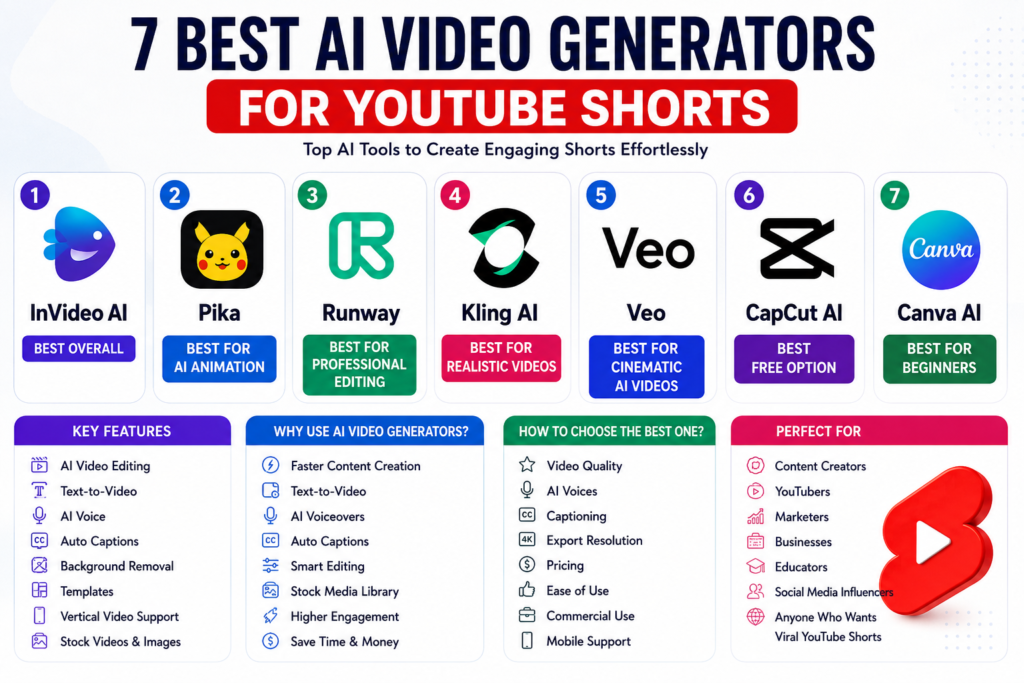
AI video generators are great tools that help make video editing easier. Some of the main advantages of using AI tools for YouTube Shorts are:
- Faster content creation
- Automatic captioning
- AI voice
- Stock videos and images
- Text to video
- Smart editing
- Higher engagement
- Saving time and money
People who make YouTube Shorts videos can greatly benefit from using AI tools since they edit videos on a daily basis. We review the best tools below.
1. InVideo AI
InVideo AI is among the best AI video generators for Youtube shorts that let creators make amazing YouTube Shorts videos effortlessly. Some of the features it offers include text to video, AI voice, auto script, extensive stock media library, one-click editing, and a vertical video editor. Below are the pros and cons of using it.
Pros
- Beginner-friendly
- Amazing video quality
- Fast editing
- Lots of templates
Cons
- Needs a subscription for advanced features
2. Pika
Pika is a promising, Best AI video generator for Youtube shorts that can create cinematic videos based on prompts. Some of the features that make it stand out are AI animation, text to video, image to video, amazing visual effects, and camera movement.
Pros
- Great for creators
- Amazing animations
- Easy to learn
Cons
- Limited free option
3. Runway
Runway is a powerful tool for creators and professional editors that can help them generate YouTube Shorts videos. Some of the best features this tool has include AI video editing, background removal, motion editing, AI effects, and text to video.
Pros
- Professional editing
- Amazing quality
- Constant updates
Cons
- Not so beginner-friendly
4. Kling AI
Kling AI has been gaining popularity rapidly for its ability to generate realistic videos. The key features include amazing AI videos, realistic motion, cinematic videos, and prompt-based editing.
Pros
- Most realistic motion
- Great creative tools
Cons
- Can be slow during peak hours
5. Veo
Veo is also consider in best AI video generator for Youtube shorts that can create incredible YouTube Shorts videos for social media. Some of the features it offers are long prompt support, cinematic videos, realistic lighting, and AI motion.
Pros
- Awesome quality
- Very realistic
Cons
- Not so available in specific regions
6. CapCut AI
CapCut has remained one of the best free video editing tools for making YouTube Shorts. Some of the features it offers for creating amazing videos include auto captions, AI script, AI voice, background removal, and trending templates.
Pros
- Has a free option
- Fast and easy editing
- Mobile-friendly
Cons
- Some templates need to be purchased
7. Canva AI
Canva has added some amazing features that enable it to become a reliable tool for video creation. Some of the features it offers for YouTube Shorts include magic media, AI presentation, AI video making, templates, and brand kits.
Pros
- Great for beginners
- Easy and fast editing
- Lots of design options and templates
Cons
- Limited editing features
How to Choose the Best AI Video Generator for Making YouTube Shorts

When choosing the Best AI video Generator for Youtube Shorts, you should consider the following factors:
- Video quality
- AI voices
- Captioning
- Resolution when exporting
- Pricing
- Simplicity
- Commercial use
- Mobile-friendly
The choice of the best AI video generator for making YouTube Shorts depends on what you want to achieve and your preferred style.
The Best AI Video Generator for Beginners
If you are a YouTube Shorts creator and a beginner, you can consider using CapCut AI or Canva AI video generators as they offer lots of free options and are easy to use.
The Best AI Video Generator for Professsional
Professionals can consider using Runway, Kling AI, InVideo AI, Veo, or CapCut. The tools offer editing features, quality, and flexibility to meet the demands of professional creators.
Tips to Make Amazing Viral YouTube Shorts
Making amazing YouTube Shorts requires not only the best AI video generators but also some tips and tricks to help you make better videos. Below are some of the essential tips that will help your YouTube Shorts video go viral.
- Catch people’s attention within the first three seconds
- Keep the videos short and sweet, i.e., less than a minute long
- Always add captions to your videos
- Add trending soundtracks to your videos
- Post consistently
- Make your own thumbnails
- Include a call to action in your videos
- Do keyword research
Common Mistakes to Avoid When Making YouTube Shorts
Avoid the following common mistakes when making YouTube Shorts:
- Only use AI to make videos without adding your creativity
- Post low-quality videos without any edits
- Skip adding captions to your videos
- Use copyrighted material to edit your videos
- Include weak prompts when using AI to make videos
- Upload irrelevant and inconsistent videos
- Forget about optimizing your video title and description
Final Remarks
Best AI Video Generators for YouTube Shorts are revolutionizing the way people can reuse their favorite videos as short clips. Top-notch AI video creation tools offer editing, text to video, auto captions, AI voices, and other professional tools to ensure your content looks different from the millions of other creators’ videos on YouTube. For example, whether you are new to video making or a professional, marketer, business owner, or content creator, the AI Video Generators for YouTube Shorts can help you get ahead of the competition by staying on top of the latest video making trends and taking your Shorts channel to the next level.
Thus, as a beginner, you can start creating amazing Shorts with the best free video generator tools like CapCut AI and Canva AI. Meanwhile, as an intermediate level video creator, you may want to consider using InVideo AI to take your Shorts to the next level. Finally, as a professional creator, you may want to try out Runway, Kling AI, and Veo to generate cinematic-quality videos with professional-level editing tools. Additionally, while choosing the best AI video creation tool for your Shorts channel, you may also want to consider your budget vs. your video editing needs. Moreover, to increase your Shorts views on YouTube, you may also want to try combining the best AI video generator tool with great storytelling, frequent posting, keyword optimization, and other YouTube SEO tips.
Frequently Asked Questions (FAQs)
1. What is the best AI video generator for YouTube Shorts in 2026?
The best AI video generator for YouTube Shorts in 2026 depends on your needs. CapCut AI and Canva AI are great for beginners, while InVideo AI, Runway, Kling AI, and Veo offer advanced features for professional creators.
2. Can AI create YouTube Shorts from text prompts?
Yes. Modern AI video generators can convert text prompts into engaging YouTube Shorts by automatically generating scripts, visuals, AI voiceovers, captions, transitions, and background music.
3. Which free AI video generator is best for YouTube Shorts?
CapCut AI and Canva AI are among the best free AI video generators for YouTube Shorts. They provide free templates, AI editing tools, automatic captions, and mobile-friendly editing features.
4. How do AI video generators help grow a YouTube Shorts channel?
AI video generators speed up content creation, improve video quality, add automatic captions, generate AI voiceovers, and simplify editing. This allows creators to post consistently, which can improve audience engagement and channel growth.
5. What features should I look for in the best AI video generator for YouTube Shorts?
When choosing an AI video generator, look for features such as text-to-video conversion, AI voiceovers, automatic captions, HD or 4K export, stock media library, vertical video support, easy editing, and affordable pricing. These features help create professional and engaging YouTube Shorts efficiently.



Leave a Reply